· engineering
Separate Tunnel Traffic From Your Account Domain
Learn how InstaWormhole isolates tunnel traffic on instawormhole.site from account cookies on instawormhole.com using edge rules and zero-trust relays.
By InstaWormhole team, Engineering
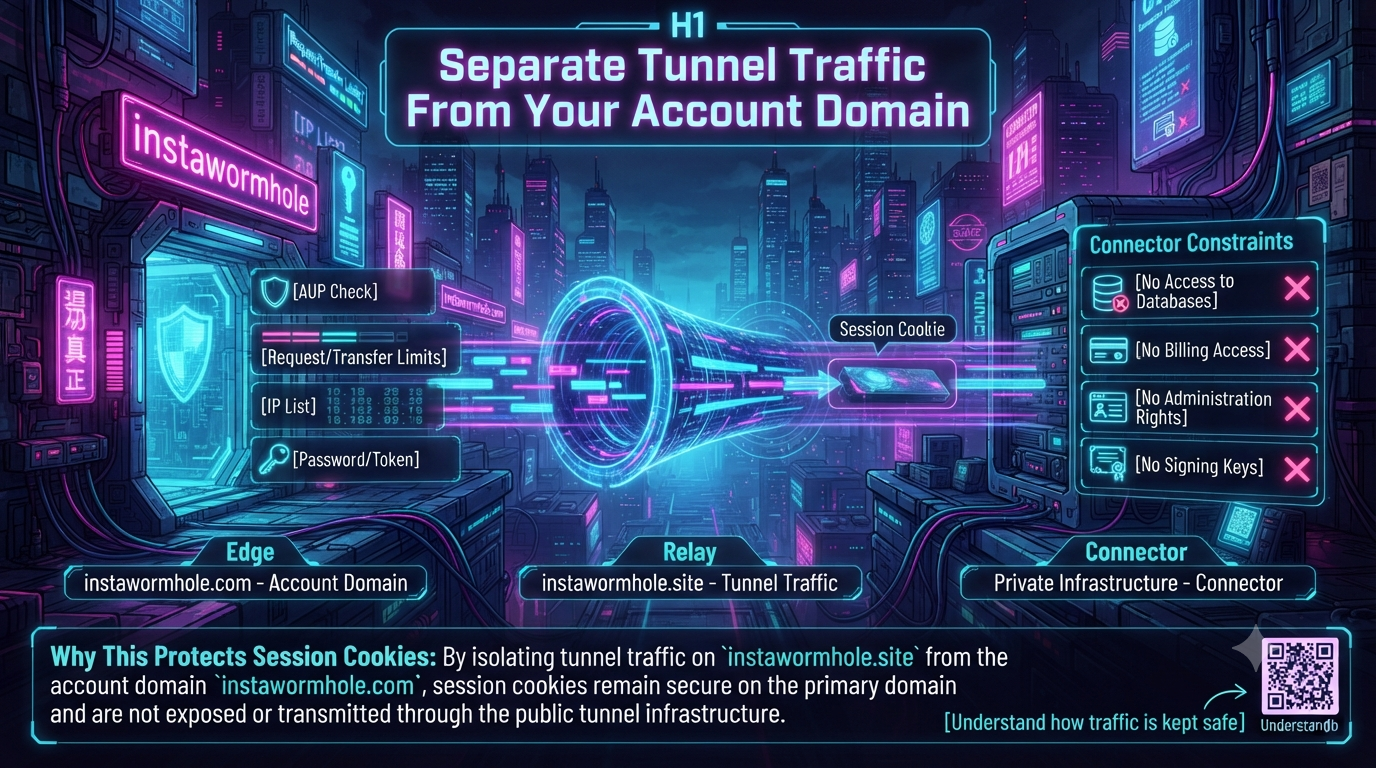
Exposing a local development server to the public internet introduces a subtle browser security risk that many developers overlook: cookie and origin isolation. When you run a local application behind a public tunnel URL, your browser treats that public URL as a distinct web origin capable of executing JavaScript, setting and reading origin-scoped cookies, and making network requests. If your public tunnel addresses share the same domain—or sit on a subdomain of the same parent domain—as the control plane where you sign in, manage billing, and configure access controls, a vulnerability in a local prototype or experimental frontend could put your account session at risk.
InstaWormhole addresses this risk at the architectural level by serving all tunnel traffic from instawormhole.site while keeping your account, sign-in, and dashboard on instawormhole.com. Understanding how requests move across the edge, relay, and connector—and how the edge enforces access rules in a fixed order—shows why domain separation and narrow component permissions keep your account separated from tunnel traffic while you share local apps.
The Architecture of a Tunnel Request: Edge to Relay to Connector
When an external visitor, webhook sender, or AI client opens your public tunnel URL, the request does not connect directly to your computer. Instead, traffic passes through three architectural components: the edge, the relay, and the connector. Each component has a distinct role and enforces clear trust boundaries so unauthorized traffic is stopped early and outbound connections carry the workload.
Visitor / Client
       |
       v  (HTTPS request to your tunnel address on instawormhole.site)
[ InstaWormhole Edge ]  ---> Evaluates rules in fixed order; fail-closed on unreadable rules
       |
       v  (Passes valid requests only)
[ InstaWormhole Relay ] ---> Treats forwarded requests as untrusted input; checks headers/payloads
       |
       v  (Over outbound connection initiated by your connector)
[ Local Connector ]     ---> Narrow permissions; forwards to local loopback address
       |
       v
[ Your Local App ]
1. The Edge
The edge is the first point of contact for any incoming request to a tunnel address on instawormhole.site. Before anything is forwarded toward your machine, the edge evaluates the tunnel's rules. As documented in Understand how traffic is kept safe, a request that fails a rule is answered by the edge and never reaches your computer.
Equally important is how the edge handles uncertainty: if the edge cannot read a tunnel's protection rule, it refuses requests to that tunnel instead of letting them through. Rather than failing open and exposing a protected endpoint during a rule lookup issue, the edge fails closed so unverified requests are turned away.
2. The Relay
A request that passes the edge checks moves to the relay. The relay connects public traffic to your local machine without requiring you to open inbound ports on your local network or firewall. Instead of reaching inward into your computer, the relay sends the request over the outbound connection that your local connector opened.
At this stage, the relay treats forwarded requests as untrusted input. Headers, redirects, and payloads are checked at each step so malformed or unexpected traffic is handled carefully along the forwarding path.
3. The Connector
The connector is the local process you run on your machine after signing in. Once it receives a request from the relay over the connection the connector opened, the connector forwards it to the local loopback address you gave it—for example, a local development server listening on 127.0.0.1:3000.
Because requests that fail edge rules are answered directly by the edge, unauthorized visitors do not reach your connector or your local application. That keeps local testing focused on legitimate traffic while preserving the boundary between the public internet and your workstation.
Why Domain Separation Protects Your Session Cookies
To see why keeping instawormhole.site separate from instawormhole.com matters in practice, consider how browsers enforce origin boundaries and cookie scoping.
When you sign in to your InstaWormhole account and use the dashboard on instawormhole.com, your browser holds session state for that domain. That session lets you manage your account, tunnels, billing, workspaces, and connected devices. If tunnel URLs were hosted on the same domain—or as subdomains sharing a parent cookie scope with your account site—browser security boundaries would be much closer together.
During active local development, applications often run with extra logging, verbose error output, work-in-progress templates, or third-party scripts that have not yet been hardened for production. If a local app exposed through a tunnel contains a Cross-Site Scripting (XSS) flaw or executes untrusted script code in a visitor's browser, script running inside that origin can act on behalf of that origin in the browser context.
Separating the two domains prevents an app behind a tunnel from reading your InstaWormhole cookies:
- Separate traffic and account domains: Tunnel traffic is served only from
instawormhole.site, while your account, sign-in, and dashboard live oninstawormhole.com. - Cookie isolation across domains: Because
instawormhole.siteandinstawormhole.comare different domains, an app behind a tunnel cannot read your InstaWormhole cookies. - Reduced blast radius for local prototypes: Testing a local frontend, webhook receiver, or demo behind a tunnel URL does not place that local app on the same domain as your
instawormhole.comaccount dashboard. - Clean separation of administrative actions: Managing tunnels, inspecting requests, configuring protection, and handling account settings remain tied to
instawormhole.comrather than the public tunnel host.
| Surface | Domain | Role | Isolation Benefit |
|---|---|---|---|
| Account & Dashboard | instawormhole.com | Account management, sign-in, dashboard, and configuration | Holds your InstaWormhole account and session apart from public tunnel origins |
| Tunnel Traffic | instawormhole.site | Serves public tunnel requests and forwards them via relay and connector | Apps behind a tunnel cannot read your instawormhole.com cookies |
Analytics isolation on sensitive pages: Third-party analytics tools used on public pages—such as Google Analytics and Microsoft Clarity—do not run on sign-in, account, or dashboard pages.
The Fixed Edge Rule Order Explained
Domain separation keeps tunnel origins apart from your account domain, while edge enforcement controls which requests can reach your tunnel in the first place. As documented in Understand how traffic is kept safe, the edge evaluates rules in a fixed order before forwarding a request toward the relay and connector.
- Acceptable Use Policy check: The edge first checks whether the tunnel address was disabled under the Acceptable Use Policy; if it was disabled, the edge answers with HTTP
410stating the address was disabled and stops handling the request. - Request and transfer limits: Next, the edge checks request and transfer limits so traffic exceeding usage or plan limits is stopped at the edge rather than reaching your local app.
- IP allow or deny list: If an IP allow or deny list is configured on the tunnel (available on Starter and higher plans, supporting up to 50 single addresses or networks in CIDR form across IPv4 or IPv6), the edge checks the visitor's network against that list and returns a refusal page if blocked or not listed.
- Password, access token, or email code: Finally, the edge checks the tunnel's visitor access protection—requiring a browser password prompt, an access token in a request header (such as
X-InstaWormhole-TokenorAuthorization: Bearer), or a listed email address verified with a six-digit code on Starter and higher plans.
Evaluating rules in a fixed sequence means a tunnel has one primary access mode at a time—anyone with the address, a password, an access token, or an email code—while an IP allow or deny list can work alongside it. Because checks happen at the edge before traffic reaches your connector, unauthorized visitors are blocked upstream.
Access Protection Modes at a Glance
You can choose the access control that fits how you are sharing a tunnel—whether that is a quick preview for a teammate, an automated script or AI client call, or a temporary link that expires automatically:
| Protection Option | How It Works at the Edge | Plan Availability |
|---|---|---|
| Anyone with the address | Any visitor with the tunnel address can open it when other checks pass | All plans |
| Password | Prompts the browser for a password before forwarding to your app | Starter and higher |
| Access token | Requires a secret token in a request header (such as X-InstaWormhole-Token or Authorization: Bearer) for scripts, AI clients, or webhooks | Starter and higher |
| Email code | Restricts access to listed email addresses using a six-digit verification code | Starter and higher |
| IP allow or deny list | Allows only listed networks or blocks listed networks (up to 50 IPv4/IPv6 addresses or CIDR ranges) | Starter and higher |
| Expiry, pause, and stop | Ends access after a chosen time window or when you switch the tunnel off | All plans |
Whenever you set, change, or remove a password or access token on a tunnel, the tunnel's live connection ends. Your connector reconnects automatically in a moment, and the tunnel address does not answer until the reconnection completes.
Least Privilege at the Local Endpoint: What the Connector Cannot Access
Strong perimeter rules are paired with narrow permissions for the local connector. When you sign a computer in via the login command and approve it in the browser, you authorize that machine to connect your local app through the tunnel—and on Linux you can pass --store file to keep the credential in a private file.
According to Understand how traffic is kept safe, the connector has narrow permissions and explicitly does not have access to sensitive platform areas:
- Databases: The connector has no access to InstaWormhole's databases.
- Billing: The connector cannot access billing settings or payment details.
- Administration: The connector does not have administrative access over your account or workspace management.
- Signing keys: The connector does not hold signing keys.
Restricting what the connector credential can do limits what happens if a development laptop, build machine, or container is ever misplaced or compromised. If you no longer want a machine connected, you can sign out with the logout command or revoke the computer under Connectors and devices in the dashboard.
Understanding the Boundaries of Tunnel Protection
Domain separation, edge checks, and narrow connector permissions protect the tunnel boundary and keep your account cookies separate from tunnel traffic, but they do not replace securing your own local application.
- Application security stays with your code: InstaWormhole does not make your app safe; anything the edge lets through reaches your app, so your application still needs its own protection against bad input.
- Check what is listening locally: Before sharing a tunnel, verify what your local server exposes on the target port so unintended routes or internal tools are not accidentally reachable when a tunnel is open.
- Data retention is configurable and scoped: As documented in Know what is kept about your traffic, request and response bodies are only retained on durable tunnels when you turn on keeping them, and sensitive header and query values are removed before storage.
- Certification scope: InstaWormhole explicitly states that it does not claim certifications such as SOC 2.
Practical Steps to Harden Your Tunnel Workflow
Applying a few disciplined habits around tunnel creation, access controls, and cleanup helps keep local sharing predictable and safe:
- Verify your local app before opening a tunnel: Confirm the service running on your local loopback address and port behaves as expected and does not expose unauthenticated debug endpoints you do not intend to share.
- Use edge protection for non-public work: On Starter and higher plans, protect sensitive tunnels with a password, access token (such as
X-InstaWormhole-TokenorAuthorization: Bearer), or email code list, and layer an IP allow or deny list (up to 50 IPv4/IPv6 addresses or CIDR entries) when calling from known networks. - Set an expiration on temporary tunnels: When creating a tunnel, pick an expiration window—such as
In 1 hour,In 1 day,In 7 days, orIn 30 days—rather than leaving short-lived previews open indefinitely. - Stop or revoke access when finished: Stop your tunnel or connector when testing wraps up, and if a tunnel shows
CONNECTOR_UNAVAILABLE—meaning the connector is recorded as connected but did not take the request—restart it (Ctrl+C, then run your connect command again) and revoke unused machines under Connectors and devices or vialogout.
Keeping public tunnel traffic on instawormhole.site while your account and dashboard remain on instawormhole.com gives you clear origin and cookie separation alongside deterministic edge enforcement and least-privilege connector permissions. For complete details on request handling, data retention, and diagnostics, read Understand how traffic is kept safe in the InstaWormhole documentation.